Building an SMB inference stack
Table of Contents
Frontier API costs are fine when you’re experimenting. They get painful once you’re running a real workload. GPT-4o is $2.50 per million input tokens and $10 per million output. Claude Sonnet 4.6 is $3 in and $15 out. Claude Opus 4.7, Anthropic’s current flagship, runs $5 in and $25 out. Anthropic also recently shifted enterprise billing to usage-based consumption pricing on top of seat fees, which means those token costs show up as a line item more visibly than before. A 10-person team doing active AI use across document drafting, summarization, code review, and internal Q&A will generate somewhere around 100 million output tokens a month. Using GPT-4o that’s $1,000/month. Sonnet 4.6 is about $1,500/month and with Opus 4.7 it climbs to $2,500/month. It might not ruin you, but it’s a recurring bill that scales directly with adoption, and adoption tends to grow.
The math changes when you own the hardware. A $15,000 server running 24/7 at full throughput starts paying for itself in months at serious API volumes. You also get things you can’t buy from a frontier API: zero egress of sensitive documents, no data retention concerns, the ability to fine-tune on your own data, and a latency profile that’s not subject to someone else’s infrastructure decisions.
This is for people who’ve already tinkered with local models and are thinking about the next step: a dedicated server, maybe a rack, maybe something you’d sell as a managed service to clients. I’m assuming you’ve read the hardware guide for individual developers or are already past that level.
The three moving parts
Before getting into hardware, it’s worth naming what you’re actually building. A production inference stack has three distinct layers.
The inference engine is the process that actually runs the model: loads weights into memory, handles batching, manages KV cache, produces tokens. vLLM, Ollama, llama.cpp, SGLang, TensorRT-LLM. These are not interchangeable and the differences matter at team scale.
The gateway/router sits in front of the inference engine and handles everything the engine doesn’t: authentication, per-user rate limiting, routing between models, cost tracking, fallback to cloud APIs when local is overwhelmed. LiteLLM is the main player here. This is the piece most first-time server builders skip and then regret.
The hardware determines what models you can run and how fast. Get this wrong and the other two don’t matter.
Hardware tiers
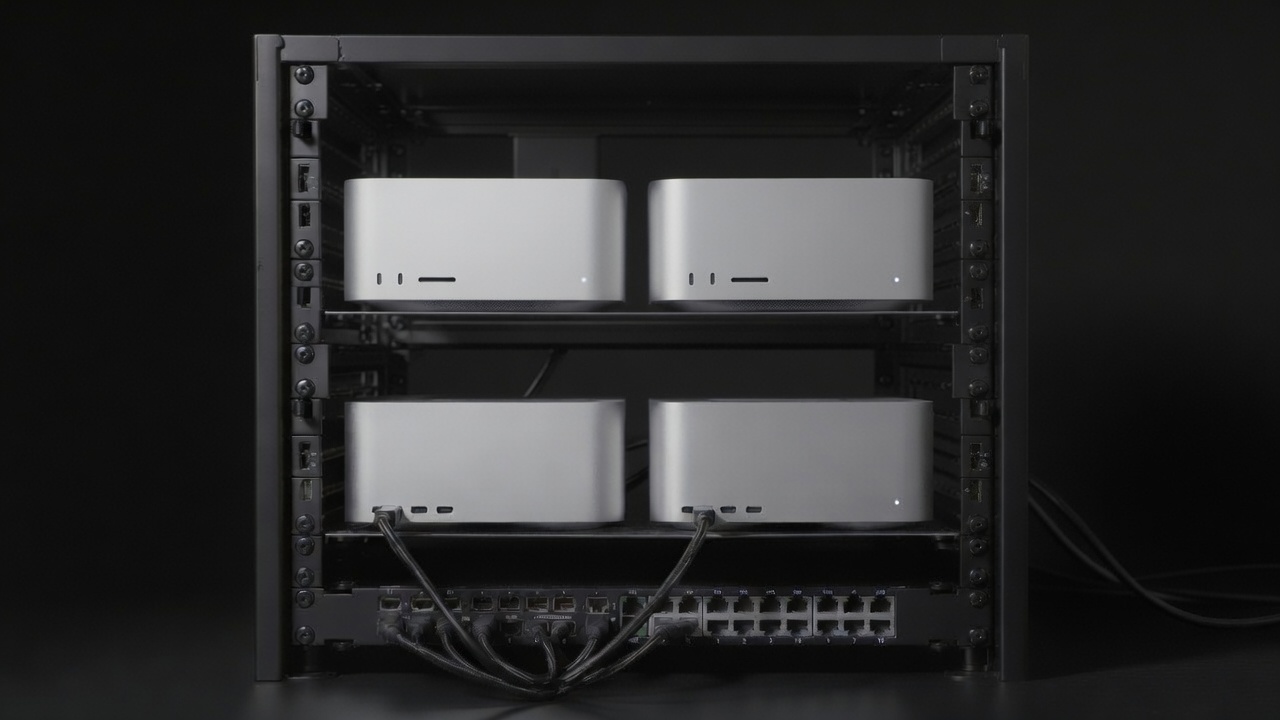
A small Mac Studio cluster, the kind of thing that fits on a shelf and serves a 5 to 15 person team.
Tier 1: High-memory single server ($5K to $25K)
This is where most teams should start. One box, one power circuit, one set of cooling concerns, no networking complexity.
Apple Mac Studio M3 Ultra: The prior post covered these as developer machines. At server scale, the picture changes a bit. A Mac Studio M3 Ultra (96GB unified, 819 GB/s) running Ollama with an OpenAI-compatible API endpoint is a legitimate inference server for a 5 to 15 person team. You can run Llama 4 Scout comfortably, DeepSeek-R1 70B at Q8, or any 70B dense model with room to spare. The 96GB ceiling means you won’t fit Maverick-class MoE models at usable quantization without heavy compression. The limitation is also concurrency: unified memory architecture means you’re sharing bandwidth across all active requests, and you don’t get the same parallel throughput as discrete NVIDIA. For teams doing mostly batch or sequential work (document processing, summarization pipelines), this is fine. For interactive multi-user chat at scale, you’ll hit the ceiling faster than the specs suggest.
The Mac Studio M3 Ultra starts at $3,999 with 96GB. Silent, efficient, zero driver pain, runs macOS (which is either a feature or a bug depending on your ops preferences). Apple Silicon supports vLLM-MLX now, which handles concurrency better than Ollama for team deployments.
NVIDIA workstation-class GPUs: The RTX PRO 6000 Blackwell (96GB VRAM, 1,792 GB/s bandwidth) at around $8,000 to $9,200 is the single-card ceiling for NVIDIA workstation hardware right now. 96GB gets you a 70B model at Q4 with throughput that makes sense for interactive use, typically 60 to 90 tokens/sec on Llama 3.1 70B depending on batch size and quantization. If you want 48GB, the L40S is the server-grade option (built for 24/7 operation, passive cooling, ECC memory) at around $8,000 to $12,000.
The CUDA ecosystem advantage is real. vLLM, TensorRT-LLM, SGLang all have first-class NVIDIA support. You get speculative decoding, PagedAttention, FlashAttention. The software story is significantly more mature than Apple or AMD.
AMD Instinct MI300X: The MI300X is interesting at this tier. 192GB of HBM3 at roughly 5.3 TB/s memory bandwidth in a single GPU. That’s more memory bandwidth than four H100s and enough capacity to run a 70B model at full precision or a 405B model quantized, without sharding. Enterprise pricing runs $10,000 to $15,000 per card. The catch is ROCm. AMD’s software stack has improved meaningfully but it still requires more configuration work than CUDA, and some frameworks have incomplete support. If you’re building on vLLM or Ollama with a model that has well-tested ROCm support (Llama, Qwen, Mistral), you’re mostly fine. If you’re doing something exotic, budget time for it.
Tier 1 comparison:
| Hardware | Memory | Bandwidth | Approx cost | 70B Q4 tok/s | TDP | tok/s/W | Best for |
|---|---|---|---|---|---|---|---|
| Mac Studio M3 Ultra | 96GB unified | 819 GB/s | ~$4K to $5K | ~30 to 45 | ~250W | ~0.14 | Low-concurrency, batch, macOS shop |
| RTX PRO 6000 Blackwell | 96GB VRAM | 1,792 GB/s | ~$9K card | ~60 to 90 | 300W | ~0.25 | Interactive team serving, CUDA stack |
| L40S | 48GB VRAM | 864 GB/s | ~$10K card | ~25 to 35 (split layers) | 350W | ~0.09 | 30B models, 24/7 server duty |
| AMD MI300X | 192GB HBM3 | 5,300 GB/s | ~$12K card | ~120 to 150 | 750W | ~0.17 | High-throughput batch, large models |
The MI300X throughput numbers look wild on paper. In practice you land closer to the lower end in real serving scenarios because bandwidth isn’t the only variable, but it’s still the fastest single-card option for large-model inference if you can get the ROCm stack working.
Why efficiency jumps between Tier 1 and Tier 2
The tok/s/W column in the Tier 1 table looks bad compared to what you’ll see at Tier 2, and the reason is worth understanding because it shapes every hardware decision at team scale.
A single GPU serving one user at a time is wasteful by design. On each forward pass through the model, the GPU reads all the weights from memory (tens of gigabytes) to produce a handful of tokens for a single request. Most of that memory bandwidth is spent moving weights, not doing useful work per watt. The GPU is underutilized.
Continuous batching changes the math entirely. Instead of serving one request per forward pass, vLLM packs multiple in-flight requests into the same pass. The weights get read once from memory and applied to dozens of concurrent requests simultaneously. Token output per joule scales almost linearly with batch size up to the point where VRAM fills up or memory bandwidth saturates. A single H100 running at batch=1 produces roughly 50 to 80 tokens/sec. The same H100 at batch=32 with FP8 and vLLM produces 1,800 to 2,000 tokens/sec. Same GPU, same power draw, roughly 25 to 40 times more tokens per watt.
This is why the efficiency numbers in the comparison matrix jump from under 0.3 tok/s/W at Tier 1 to 1.0 to 2.9 tok/s/W at Tier 2. It’s not that the hardware is fundamentally different. It’s that Tier 2 deployments have enough concurrent users to actually saturate the batch. A single-user developer setup running Ollama is running at batch=1 almost all of the time. A 20-person team hitting an inference server through LiteLLM is generating enough concurrent requests to fill a batch continuously. That utilization difference, not the GPU specs, is what makes the per-watt numbers look so different between tiers.
The practical implication: if you’re choosing hardware for a team deployment, pick for the batch throughput ceiling, not single-request latency. And if you’re already running a Tier 1 box for a team, before you upgrade the hardware, check whether you’re actually running continuous batching. Switching from Ollama to vLLM on the same hardware can double or triple your effective throughput with no additional spend.
Tier 2: Multi-GPU server ($25K to $100K)
Two to four GPU configurations running vLLM with tensor parallelism. This is where 70B models get comfortable at real concurrency levels and 405B models become plausible.
2x to 4x L40S: Four L40S cards (48GB each, 192GB total) in a Supermicro or Dell server lands around $60,000 to $80,000 all-in. You’re running Llama 3.1 70B at Q4 with comfortable headroom, good concurrency via vLLM’s continuous batching, and a server that can handle 20 to 50 concurrent users without breaking a sweat. The L40S is still available new through CDW, ASA Computers, ServerSupply, and Viperatech at around $7,500 to $10,000 per card (don’t confuse it with the original L40, which is EOL). Probably the most cost-effective Tier 2 config for businesses that need reliable 70B inference without betting on newer silicon.
From a power efficiency standpoint, 4× L40S running Llama-2-70B FP8 with vLLM achieved 1,718 tokens/sec in batch (offline) mode and 1,469 tokens/sec in server mode in MLPerf Inference v4.1 results published by Red Hat. At 4× 350W TDP (1,400W total draw), that works out to roughly 1.2 tok/s/W at batch throughput and 1.0 tok/s/W under interactive load. These are measured results on a production workload, not marketing specs.
2x to 4x RTX PRO 6000 Blackwell Server Edition: The current-gen replacement for the L40S in the PCIe server card category. 96GB GDDR7 (double the L40S), 1.6 TB/s memory bandwidth (nearly double), fifth-gen Tensor Cores, FP4 support. Four cards gives you 384GB total, enough to run Llama 3.1 70B at full FP16 with room left for large KV caches, which the L40S can’t do. Available now from Lenovo, AMAX, Hyperscalers, and on Amazon at $8,000 to $9,200 per card, putting a four-card server at $80,000 to $100,000 all-in. The catch is the 600W TDP per card: four cards draws 2,400W in GPU power alone versus the L40S at 1,400W, which starts to matter for colo power budgets. vLLM and SGLang both have Blackwell support. If you’re buying new hardware today and plan to run it for three to five years, the RTX PRO 6000 Server Edition is the better starting point.
2x H100 SXM: Two H100s (80GB each, 160GB total) runs $80,000 to $120,000. Faster raw throughput than four L40S cards, better for latency-sensitive workloads. The H100 SXM variant matters here: SXM has NVLink interconnect between cards, which means tensor parallelism across them is fast. PCIe-connected GPUs have to go through the CPU interconnect and the bandwidth penalty is real.
The H100 SXM draws 700W each. At continuous batching with FP8 and vLLM, a single H100 achieves approximately 2,000 tokens/sec on Llama 3.1 70B, giving ~2.9 tok/s/W per card, roughly 2.4× more efficient per watt than 4× L40S on the same workload. The tradeoff is that each H100 costs significantly more than each L40S, so the L40S config wins on capital cost per token even if it loses on power cost per token. For colo deployments billing on power draw, that efficiency gap starts to matter at scale.
On self-build vs. branded systems: Lambda Labs, Supermicro, and Dell all sell rack-mount GPU servers in this tier. Self-building is possible but you’re taking on the support burden, and the savings over a Supermicro system are smaller than people expect once you factor in rail kits, power distribution, and the time to debug weird firmware interactions.
vLLM is the right inference engine at this scale. Its continuous batching, PagedAttention, and tensor parallel support across multiple GPUs are production-tested. SGLang edges it out on throughput for some workloads (roughly 29% higher on 7B to 8B models on H100, narrowing to 3 to 5% on 70B), and has better latency tails. Either works; vLLM has a larger community and more deployment examples.
Tier 3: Rack scale ($100K+)
Eight-GPU nodes, multiple nodes, InfiniBand networking. This is where you’re running 405B+ models comfortably, serving hundreds of concurrent users, or building a managed service for multiple clients.
An 8x H100 SXM server from Supermicro (the SYS-821GE-TNHR is the reference system) runs $200,000 to $320,000 depending on configuration. A rack with four of these nodes is $800K to $1.2M in hardware. That’s before NDR InfiniBand switches, PDUs, and colocation, all of which cost more than most people budget.
On networking first: inter-node GPU communication is the thing that makes or breaks distributed inference. 1GbE is a non-starter. 10GbE is marginal. 25GbE is the floor, and 100G+ InfiniBand is what serious systems actually run. A pair of NDR 400G switches to connect four nodes adds roughly $200K to $300K to the hardware bill and another 1.5 kW to the power draw. vLLM handles pipeline and tensor parallelism across nodes, but it needs the bandwidth to go with it.
Power is where the math gets uncomfortable. The GPU TDP figure (700W × 8 = 5.6 kW) is not the system draw. NVIDIA’s own DGX H100 spec puts total system power at 10.2 kW, covering CPUs, NVLink switch fabric, memory, storage, and cooling. The Supermicro SYS-821GE-TNHR ships with eight 3,000W PSUs for a reason. Four nodes at 10.2 kW each is 40.8 kW in compute alone. Add the InfiniBand switches and overhead, and you’re at 43 to 45 kW of IT load per rack. At a typical data center PUE of 1.3 to 1.5, the facility draw is 56 to 68 kW per rack.
That is not a standard cabinet, and finding a facility that will take it is harder than it sounds. Most colo providers cap air-cooled racks at 15 to 25 kW; above that you’re in dedicated high-density space, often negotiating liquid cooling. Many Tier I operators (Equinix, Digital Realty, CoreSite) won’t touch a sub-100 kW deployment in 2026 given power queue backlogs. Expect to work with mid-tier or regional providers. Current US market rates for committed high-density power run $130 to $225 per kW per month, depending on market. At 44 kW committed, that’s $68K to $119K per year per rack in power alone, before cross-connects ($100 to $400/month each) and remote hands ($150 to $300/hour). Budget the actual number before signing anything.
The Watt Counts benchmark paper (arXiv:2604.09048) makes the point cleanly: at rack scale, power capacity is the binding constraint, not GPU count. Every improvement in tokens/watt directly reduces facility footprint and operating cost. A fully utilized 8-GPU node with vLLM FP8 and continuous batching produces around 16,000 tokens/sec, which works out to roughly 2.5 to 2.9 tok/s/W against full system draw. That’s a useful planning number: divide your throughput requirement by it and you get the power budget you need to secure before you order hardware.
Who needs this? MSPs building multi-tenant AI platforms, enterprises with very high-volume document processing, anyone seriously selling inference as a product. At this scale, self-hosted tokens cost well under $1/M for 70B-class models, versus $10/M for GPT-4o, $15/M for Claude Sonnet 4.6, or $25/M for Opus 4.7. The economics work. The challenge is utilization: the infrastructure costs what it costs whether the GPUs are busy or not.
If you want to push further and fancy yourself a hyperscaler, the next frontier is megawatt-scale rack architectures that make a four-node H100 cabinet look quaint. I wrote about where that’s heading: Megawatt racks and what comes after.
Comparison matrix
| Tier | Approx cost | Concurrent users | Max model size | Throughput (70B ref) | Efficiency (tok/s/W) | Example use case |
|---|---|---|---|---|---|---|
| Tier 1: Single server | $5K to $25K | 5 to 20 | 70B to 405B (quant) | 30 to 150 tok/s | 0.09 to 0.25 | Small business document processing; solo MSP onboarding first clients |
| Tier 2: Multi-GPU server | $25K to $100K | 20 to 100 | 405B (quant), 70B comfortable | 150 to 600 tok/s | 1.0 to 2.9 | Mid-size business AI platform; VAR serving 5 to 10 business clients |
| Tier 3: Rack scale | $100K to $1M+ | 100 to 500+ | Full precision 405B+, multi-model | 1,000+ tok/s | 2.5 to 2.9 per node | Multi-tenant MSP with dozens of clients; high-volume batch processing at enterprise scale |
The efficiency column reflects tok/s per watt at continuous batching with FP8/Q4 quantization on Llama 3.1 70B. Tier 1 and Tier 2 numbers use GPU TDP as the denominator (single-card or multi-card draw). Tier 3 uses full system draw (10.2 kW per 8-GPU node per NVIDIA DGX H100 spec), which is the right number for facility planning. Tier 1 numbers reflect single-GPU single-request throughput; the step change at Tier 2 comes from vLLM’s continuous batching. Sources: MLPerf Inference v4.1 L40S results (Red Hat), Spheron H100 tokens/watt analysis, Watt Counts benchmark (arXiv:2604.09048).
Clustering: connecting machines together
Everything above assumes a single machine with one or more GPUs in it. That’s the right starting point for most teams. But once you’ve maxed out what a single box can hold, or you want to run models larger than any single node can fit, clustering is the next question. The answer is significantly different depending on whether you’re on Apple Silicon or NVIDIA.
Mac clustering: exo and RDMA over Thunderbolt
The Apple path is interesting, partly because it wasn’t really viable until late 2025.
The software that makes it work is exo, an open-source clustering tool from Exo Labs. Exo handles automatic device discovery (no manual configuration), distributes model weights across nodes using tensor parallelism (not pipeline parallelism, which matters a lot, as I’ll explain below), and exposes a single OpenAI-compatible API endpoint across the whole cluster. It uses MLX as its inference backend, which means it’s Mac-only today. Linux support via GPU is still in development.
The network path matters enormously. Running two Mac Studios over 2.5GbE Ethernet works, but you’re leaving most of the benefit on the table. Thunderbolt 5 does roughly 50 to 60 Gbps real-world throughput between nodes. The bigger improvement came when macOS 26.2 added RDMA support over Thunderbolt 5, and exo 1.0 shipped day-zero support for it. RDMA drops inter-node memory access latency from around 300 microseconds down to under 50 microseconds. That latency gap is what separates “this technically works” from “this actually makes the model faster as you add nodes.”
To enable it, you boot each Mac into recovery mode, run rdma_ctl enable in Terminal, and reboot. That’s the whole setup on the Mac side. Exo handles the rest.
The hardware constraint to understand is Thunderbolt topology. Thunderbolt 5 switches don’t exist. Every Mac has to be directly cabled to every other Mac. Right now the practical ceiling is four nodes, in a full-mesh where each machine has a direct TB5 connection to all the others. You also can’t use the Thunderbolt 5 port adjacent to the Ethernet port on the Mac Studio back panel for RDMA, and all machines in the cluster need to run the exact same macOS version (including minor beta numbers) or the RDMA discovery breaks.
Jeff Geerling benchmarked a 4-node cluster of M3 Ultra Mac Studios using Apple loaner hardware (two at 512GB, two at 256GB, configurations that aren’t available to buy; the current M3 Ultra tops out at 96GB) using exo with RDMA and got:
| Model | Parameters | Active params | Cluster tok/s |
|---|---|---|---|
| Qwen3-235B (8-bit) | 235B MoE | 22B active | ~32 tok/s |
| DeepSeek V3.1 (8-bit) | 671B MoE | 37B active | ~15 tok/s |
| Kimi K2 Thinking (native 4-bit) | ~1T MoE | 32B active | ~30 tok/s |
Those throughput numbers are interesting for what they demonstrate about the architecture, but the memory configuration isn’t something you can actually buy. Four standard M3 Ultra Mac Studios at 96GB each gives you 384GB total: enough to run Qwen3-235B at Q4 comfortably, but you’re not fitting DeepSeek V3.1 671B at 8-bit without very heavy quantization, and Kimi K2 Thinking at native weights is out entirely. More practically: four M3 Ultras at $3,999 each is $16K in hardware before storage and networking cables, and you’re running a cluster you can only expand to four nodes. The practical point: exo with RDMA over Thunderbolt 5 scales up as you add nodes, rather than staying flat or degrading. That’s the real test for a distributed inference implementation, and it passes. But the memory ceiling of what you can actually purchase matters more than the benchmark hardware.
The alternative for Mac clustering without RDMA is llama.cpp’s RPC backend, which spreads model layers across nodes using pipeline parallelism. It works for fitting models that won’t fit on one machine, but throughput degrades as you add nodes because each layer’s output has to be transferred before the next node can start work. Exo’s tensor-parallel approach does more communication per step but computes in parallel rather than sequentially, which is why you see a speedup with more nodes instead of a slowdown.
What doesn’t work across Mac clusters: vLLM, SGLang, TensorRT-LLM. All NVIDIA CUDA. The Mac path is exo plus MLX, full stop.
NVIDIA clustering: NVLink and InfiniBand
The NVIDIA clustering story is better-documented and more mature, but the network requirements are unforgiving.
Within a single server, NVLink is the interconnect for SXM-form-factor GPUs (H100 SXM, H200 SXM). NVLink bandwidth between cards is 900 GB/s in the H100 generation. That’s fast enough to treat the cards as a single unified pool for tensor parallelism in vLLM. PCIe-connected GPUs (L40S, RTX PRO 6000) share bandwidth through the CPU interconnect instead, which cuts effective inter-GPU bandwidth to roughly 128 GB/s bidirectional (PCIe 5.0 x16). Tensor parallelism still works, but it’s slower, and you’ll see the difference in throughput on large models.
vLLM handles multi-GPU distribution via Megatron-LM tensor parallelism. For single-server multi-GPU, set --tensor-parallel-size to the number of GPUs and launch normally. For multi-node, you start a Ray cluster first:
# On the head node
ray start --head

# On each worker node
ray start --address=<head-node-ip>:6379

# Then launch vLLM on the head node, setting tensor-parallel-size to total GPU count
python -m vllm.entrypoints.openai.api_server \
  --model meta-llama/Llama-3.1-70B \
  --tensor-parallel-size 8   # 2 nodes × 4 GPUs each
SGLang works similarly. Both use Ray as the distributed runtime.
Multi-node networking is where this gets expensive. 10GbE between nodes is marginal. 25GbE is the floor for small-scale (2 to 4 node) deployments. Serious multi-node inference runs on InfiniBand: HDR (200 Gbps) or NDR (400 Gbps). The difference isn’t marginal: running a 70B model across two H100 nodes over 10GbE versus 100G InfiniBand can drop throughput by 30 to 50% due to the all-reduce communication bottleneck during each forward pass. If you’re spending $100K+ on GPU hardware and using a $200/switch for the interconnect, you’ve made a mistake.
The NVLink SXM advantage also shows up here: H100 SXM nodes connected via NVLink Switch fabric (the NVSwitch-based backplane in DGX systems) treat cross-node bandwidth nearly the same as intra-node bandwidth, which is why 8-GPU DGX nodes are so effective for large model inference.
Network requirements summary:
| Setup | Minimum | Recommended | Notes |
|---|---|---|---|
| Mac cluster (exo) | Thunderbolt 5 direct cable | TB5 full mesh + RDMA | No switches; point-to-point only; max ~4 nodes |
| NVIDIA single-server (SXM) | NVLink (built-in) | NVLink with NVSwitch fabric | Already present in SXM systems |
| NVIDIA single-server (PCIe) | PCIe 5.0 x16 | PCIe 5.0 x16 | ~128 GB/s bidirectional vs 900 GB/s NVLink |
| NVIDIA multi-node | 25GbE | HDR/NDR InfiniBand (200 to 400 Gbps) | IB adds $20K to $100K+ per switch depending on port count |
Dense models vs MoE: clustering impacts them very differently
This is something I haven’t seen explained clearly elsewhere, and it changes the calculus on whether clustering is worth it for a given model.
Dense models (Llama 3.1 70B, Qwen2.5-Coder 32B, and similar) read all their weights through memory on every forward pass. Every token generated requires touching all 70 billion parameters. This means memory bandwidth is the primary bottleneck, and adding more nodes only helps if the nodes can share bandwidth fast enough. With NVLink, this works well because the interconnect is wide enough. With anything slower, the cross-node transfer overhead starts eating into the gains. Tensor parallelism on a 2-node NVIDIA NVLink setup for a 70B dense model gives you roughly 1.7 to 1.9x throughput (not quite linear due to communication overhead). On PCIe multi-node at 25GbE, that scales down toward 1.2 to 1.4x at best. The communication tax is real.
MoE models are different in an important way. A model like Qwen3-235B has 235 billion total parameters but only activates 22 billion of them per forward pass (hence “Mixture of Experts”: each token is routed to a small subset of expert layers, not all of them). The 213 billion inactive parameters still have to be held in memory and loaded as-needed when their expert layer is selected, but they aren’t contributing to bandwidth usage on every single token.
The practical implication for clustering is that MoE models get two distinct benefits from adding nodes: more total VRAM to hold the full weight set without heavy quantization, and the ability to run models that wouldn’t fit on one machine at all. The communication overhead of tensor parallelism also tends to be lower for MoE compared to dense models at the same parameter count, because you’re routing fewer active parameters across nodes per pass.
This explains why the Mac cluster benchmarks above were MoE models, and why that’s also what makes sense on purchasable hardware. With four M3 Ultras at 96GB each (384GB total), Qwen3-235B MoE fits cleanly at Q4 and runs well across nodes because the inter-node traffic is mostly routing decisions and activations, not the full 235B weight matrix. You’d never attempt Llama 3.1 405B (dense) across a Mac cluster at useful quality because moving all 405B parameters through memory on every token would saturate the Thunderbolt 5 links almost immediately.
The rough practical guidance: if you’re clustering primarily to fit a model that’s too large for one machine, MoE is your friend and clustering works well. If you’re clustering to get more throughput on a model that already fits, dense models need very fast interconnects (NVLink or InfiniBand) to see meaningful gains.
Query routing
Every non-trivial inference setup needs a router in front of the model server. The reasons pile up fast: you need to handle different models for different task types (you’re not running Whisper through vLLM), you want fallback to cloud APIs when local is overwhelmed, you need authentication and per-user rate limiting, and you want to track what’s being spent where.
LiteLLM is the right answer for most setups. MIT-licensed, actively maintained, exposes a single OpenAI-compatible API endpoint that routes to 100+ backends including local vLLM/Ollama instances and cloud APIs. You configure routing rules, it handles the rest. Your application code never needs to know whether a request is going to local hardware or a cloud API.
Portkey is the polished hosted alternative. Better observability UI out of the box, commercial support, governance and guardrails built in. Worth considering if you’re building a managed service and don’t want to operate the gateway infrastructure yourself.
RouteLLM from the LMSYS team (the Chatbot Arena people) is academically interesting: it trains classifiers on human preference data to predict which model will produce better output for a given prompt, then routes based on that prediction. In practice it’s more useful for routing between different-quality versions of the same task than for task-type routing. Research-grade, not production infrastructure.
The three routing strategies that actually matter for a business inference stack:
Capability-based routing: Different endpoint for each task type. Whisper endpoint for audio, vision model for image queries, general LLM for text. The client specifies the task type in the model parameter, LiteLLM routes accordingly. Simple, explicit, reliable.
Cost-based routing: Route to local first, fall back to cloud if the queue depth exceeds a threshold. Requires you to monitor local queue depth and expose it to the router, but LiteLLM supports this.
Load-based fallback: Under normal conditions, everything runs local. When local inference is overloaded (say, a batch job is saturating the GPU), interactive requests fall back to cloud APIs. Ensures interactive users don’t notice the batch job.
Usage tracking and billing
This is where “self-hosted” gets complicated if you’re reselling.
LiteLLM’s proxy has built-in per-user and per-team spend tracking. It automatically tracks token counts per API key, associates keys with users or teams, and exposes a /user/daily/activity endpoint with spend breakdowns by model, date, and API key. For internal chargeback within a company, this is sufficient out of the box.
For billing external clients, you still need to build the last mile. LiteLLM gives you token counts and can export to Prometheus. What it doesn’t give you: invoice generation, payment processing, client-facing dashboards, or any concept of your billing rate per token. You need to build or buy that layer.
A workable reseller billing pipeline: LiteLLM for token attribution (per client API key), Prometheus for metrics export, your billing system for rate application and invoice generation. If you’re just getting started with a handful of clients, simpler still: query the LiteLLM API monthly, pull per-key token counts, apply your markup in a spreadsheet. Unglamorous. Effective.
Worth naming plainly: there is no off-the-shelf managed inference billing platform for self-hosted models the way Stripe is for payments. You’re assembling pieces.
Models by task type
Not all tasks need the same model. Running a 70B model for tasks that a 7B handles fine wastes memory and throughput. Here’s what’s actually worth running at each tier:
| Task | Recommended model(s) | Min tier | At scale | Notes |
|---|---|---|---|---|
| Document summarization (long) | Qwen3 72B, Llama 3.1 70B | Tier 1 (96GB VRAM) | Tier 2 for 20+ concurrent users | Qwen3 and Llama 3.1 70B both have 128K context. Either is excellent. |
| RAG / document Q&A | Qwen3 30B-A3B, Llama 3.1 8B | Tier 1 (32GB VRAM) | Tier 1 scales well; retrieval quality matters more than model size | 8B is often fine. Invest in the retrieval pipeline before upgrading the model. |
| Voice to text | Whisper large-v3-turbo | 8GB VRAM (any tier, secondary card) | Tier 2+ for high-volume transcription alongside LLM workloads | 25 to 30x real time on GPU. Keep it on its own card, it competes for KV cache. |
| Image / vision tasks | Qwen2-VL 72B, Llama 3.2 Vision 90B | Tier 1 (80GB+ VRAM) | Tier 2 for concurrent vision + text serving | Vision models are larger than text equivalents for the same quality bar. |
| PDF extraction / OCR | Whisper-style pipeline or Qwen2-VL | Tier 1 (16GB VRAM) | Tier 2 for high-volume batch | Tesseract still wins for clean scans. VLMs add value for complex layouts. |
| Document writing / editing | Qwen3 30B-A3B, Llama 3.1 8B | Tier 1 (16GB VRAM) | Tier 1 handles most business volumes | 8B with good prompt engineering often beats 70B with lazy prompts. |
| Code / software development | Qwen2.5-Coder 32B | Tier 1 (32GB VRAM) | Tier 2 for team-wide interactive use | Matches GPT-4o on HumanEval, outperforms it on SWE-bench for practical agentic coding. |
| General reasoning / complex tasks | DeepSeek-R1 70B, Qwen3 235B-A22B | Tier 1 (96GB+) | Tier 2 for 235B MoE at real concurrency; Tier 3 for multi-tenant serving | DeepSeek-R1 for structured reasoning. Qwen3 235B-A22B MoE is the quality ceiling for open weights. |
| Multi-tenant AI platform (mixed workloads) | Multiple specialized models | Tier 2 | Tier 3 for dozens of clients or 100+ concurrent users | At this scale you’re running separate endpoints per task type behind a LiteLLM router. |
A few things worth flagging. Put Whisper on a separate GPU from your main LLM inference stack if possible: it’s a different architecture, uses memory differently, and you don’t want audio transcription jobs competing with document processing for KV cache. If your server has two cards, Whisper goes on one and the LLM stack on the other.
For RAG workloads, the model size matters less than people expect. A 7B or 8B model with well-structured context and good retrieval usually beats a 70B model with poor retrieval. Invest in the retrieval pipeline before upgrading the model.
7B models are good enough for a surprising range of business tasks: document classification, entity extraction, sentiment analysis, first-pass summarization, simple Q&A. Don’t run a 70B model for jobs where a 7B does the work. The throughput difference is enormous. You’ll serve 5 to 10x more concurrent requests at the same latency.
Latency and where you host it
Two latency numbers matter: time to first token (TTFT) and tokens per second after that.
TTFT is the latency a user actually feels. The typing indicator appears, then they wait. 200ms is the standard threshold for “responsive”. Below 200ms feels interactive. 500ms is noticeable. 1,000ms+ feels like a loading state, not a chat interface. For interactive use cases (chat, document Q&A, code suggestions), TTFT is the number to optimize.
Tokens per second is what matters for throughput once generation starts. For reading text in a UI, anything above 30 tok/s feels fast. For background batch processing, throughput matters and TTFT doesn’t.
These two metrics trade off against each other, which is annoying. Continuous batching (what vLLM does) increases throughput dramatically by serving multiple requests in parallel, but it can increase TTFT because a new request has to wait for the current batch to make progress before it gets scheduled. At low concurrency this isn’t a problem. At 50 concurrent users, you need to tune the batching parameters or TTFT will degrade.
“Hosted nearby but not on-prem” is a real option and I think it’s underrated. A GPU server in a colocation facility 30ms of round-trip latency away will have TTFT in the 250ms to 400ms range for a typical prompt (30ms network + 50 to 200ms prefill depending on prompt length). That’s acceptable for most use cases. On-prem eliminates the network component but adds physical management burden. For most small businesses and MSPs, colocation is the right tradeoff: you own the hardware and the data never leaves your control, but someone else handles the facility.
On storage: model weights are big. Llama 3.1 70B at Q4 is about 40GB. Qwen3 235B-A22B at Q4 is around 130GB. If you’re running multiple models, you want NVMe, not spinning disk. Not for performance during inference (weights are loaded into GPU memory, not streamed from disk on every token), but for reasonable load times when switching models. An NVMe array with 2TB to 4TB is the right starting point for a multi-model server.
Reference configurations
Small: ~$8K to $10K total
Mac Studio M3 Ultra ($3,999 base, ~$4,500 to $5,500 configured) plus $3,000 to $4,500 for NVMe storage, networking, and UPS. Ollama or vLLM-MLX for inference, LiteLLM proxy in front, Prometheus for metrics. Run Qwen3 30B-A3B for most tasks, Llama 3.1 8B for high-volume lightweight work, Whisper large-v3-turbo for transcription.
Capacity: 5 to 15 concurrent users doing document processing and summarization. Not the right setup for more than a few concurrent heavy users.
At $10/M output tokens from a frontier API and around 500M tokens/month, you’re spending $5,000/month on API costs. A $10K server pays for itself in 2 months. At lower volumes the math is tighter.
Medium: ~$60K to $100K total
4x L40S (48GB each, 192GB total VRAM) in a Supermicro or Dell server, plus networking, NVMe storage, colocation first year. All-in around $60,000 to $80,000. If you’re buying new today, 4x RTX PRO 6000 Blackwell Server Edition is worth serious consideration: 384GB total at full precision, better throughput headroom, similar server chassis, all-in around $80,000 to $100,000. vLLM with tensor parallel across the four cards, LiteLLM proxy with per-user tracking, Grafana/Prometheus for visibility. Llama 3.1 70B at Q8 as the main model, Qwen2.5-Coder 32B on a separate endpoint, Whisper on its own card.
Capacity: 20 to 50 concurrent users. Production-grade serving for a mid-size business or a small MSP with a handful of clients. 150 to 300 tok/s aggregate throughput on 70B.
At $2M tokens/month output (not extraordinary for a 30-person team using AI across document workflows), frontier API costs run $20,000+/month. The $60,000 server investment pays back in 3 months. At 500K tokens/month you’re looking at 12 to 18 months payback, which is still reasonable for a 3 to 5 year hardware lifecycle.
Large: ~$500K total
Two 8x H100 SXM nodes ($400K to $640K in hardware depending on configuration), NDR InfiniBand switch, NVMe storage array, and colocation for year one. Hardware alone pushes this well past the $250K number that circulates in smaller-scale discussions. Colo for two nodes at ~22 kW committed runs $35K to $60K/year at current US market rates, before cross-connects and remote hands. Call it $500K all-in for a realistic first year, more if you’re in a high-cost market like Northern Virginia or Silicon Valley. vLLM with pipeline and tensor parallel across nodes, LiteLLM as the unified gateway, custom billing middleware feeding your invoicing system.
Capacity: 100+ concurrent users. Multi-tenant MSP with multiple business clients. Enough headroom to run batch jobs in parallel with interactive serving.
Cost per million tokens below $0.05 at good utilization. The economics are compelling if you’re billing clients even $1 to $2 per million tokens. At Claude Sonnet 4.6 pricing ($15/M output) and 5M output tokens/month, you’re spending $75K/month on APIs. A $500K infrastructure investment pays back in under a year at that volume. The challenge is maintaining the utilization that makes the math work, not the economics.
What I’d actually build
The medium configuration is the most interesting to me from a business standpoint. It’s the tier that hits a useful intersection: a 20 to 50-person business or MSP serving a handful of clients, generating 1 to 2 million output tokens per month per client, and spending enough on frontier APIs that the $60K to $80K hardware investment pays back in under six months. Four L40S cards draw about 1.4 kW under GPU load, well inside what any standard colo accepts without a conversation about liquid cooling or dedicated high-density space. You get real serving capacity without the facility negotiation headaches that come with Tier 3. Four L40S cards in a Supermicro chassis, vLLM, LiteLLM, and a thin billing layer. It’s a legitimate business you can run out of a half-rack.
The hard part is the operational layer: monitoring inference server health, managing model updates without dropping requests, building enough around LiteLLM to actually send invoices. Those are real engineering problems that take real time. If you’re a solo operator, budget for that before assuming the hardware cost is the whole story.
But the unit economics work, and they’re getting better. Open-source models in 2026 are competitive with frontier APIs for most business tasks. The gap has closed enough that “we just use OpenAI” is increasingly a choice about operational simplicity rather than quality. That’s worth knowing, even if you decide the tradeoff isn’t worth it for your situation.